How does React work?
Before getting into the nitty-gritty details, we must first know about
-
Components
-
State
-
Props
Understanding Document Object Model (DOM)
DOM stands for Document Object Model, which is a programming interface for web documents. It treats an HTML or XML document as a tree structure wherein each node is an object representing a part of the document. It is used to connect web pages to programming languages and scripts.
It is a representation of the HTML structure in a tree of objects where each part of your HTML document (elements, attributes, text) is represented as a node with parent-child relationships based on their nesting in the HTML code. It allows JavaScript and CSS styles to interact and manipulate the elements on the webpage.
Consider this HTML
<!DOCTYPE html>
<html>
<head>
<meta charset="UTF-8">
<title>DOM Visualizer</title>
</head>
<body>
<h1>DOM Visualizer</h1>
<div>
<!-- This is a comment -->
<h2>The StackSmith</h2>
<p>Engineer / Developer</p>
</div>
</body>
</html>
The DOM tree for the HTML code will look like this
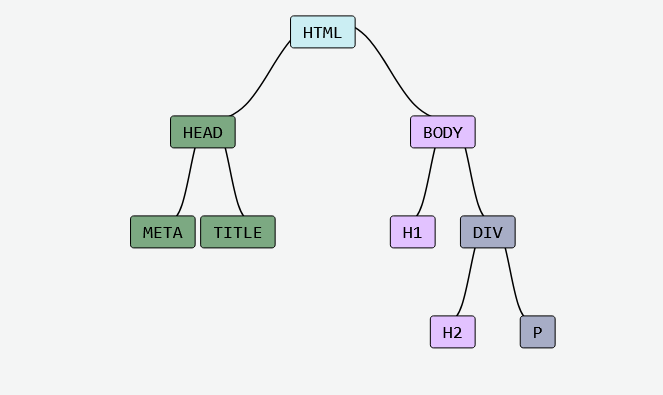
Why is DOM used?
Web browsers use the DOM to represent and manipulate HTML documents. For browsers, the tree-like structure enables easy identification and positioning of the HTML elements.
However, due to the implementation of a tree structure, any changes made to the DOM are resource-intensive and time-consuming. When DOM is altered the browser has to recalculate the element’s size and position again and has to repaint the screen.
Here comes Virtual DOM, an efficient way to update the DOM. React’s efficient update mechanism uses this virtual DOM to only change the parts of the webpage that need updating, instead of updating the whole page. This is what makes React Fast.
Understanding Virtual DOM
As the name suggests virtual DOM isn’t a real DOM. It is represented as a tree structure using JavaScript objects and is a representation of the actual DOM. The virtual DOM is stored in memory and React uses virtual DOM to keep track of the changes and efficiently update the real DOM as needed.
For the example above, the virtual DOM will look like this
{
tagName: "html",
attributes: {},
children: [
{
tagName: "head",
attributes: {},
children: [
{
tagName: "title",
attributes: {},
children: ["Virtual Document Object Model"],
},
],
},
{
tagName: "body",
attributes: {},
children: [
{ tagName: "h1", attributes: {}, children: ["DOM Visualizer"] },
{
tagName: "div",
attributes: {},
children: [
{ tagName: "h2", attributes: {}, children: ["The StackSmith"] },
{ tagName: "p", attributes: {}, children: ["Engineer"] },
],
},
],
},
],
};
Fig: JavaScript Object Representation of DOM
Now let us take a JSX code and see how the virtual DOM looks like in React
import React, { useState } from 'react';
function App() {
const [count, setCount] = useState(0);
return (
<div>
<h1>Counter: {count}</h1>
<button onClick={() => setCount(count + 1)}>IncrementCounter</button>
</div>
);
}
export default App;
When you do
console.log(App())
the virtual DOM representation will look like this
{
type: "div",
$$typeof: Symbol(react.element),
key: null,
ref: null,
props: {
children: [
{
type: "h1",
$$typeof: Symbol(react.element),
key: null,
ref: null,
props: {
children: [
0: "Counter:",
1: 0
],
},
_owner: null,
_store: {},
},
{
type: "button",
$$typeof: Symbol(react.element),
key: null,
ref: null,
props: {
children: "IncrementCounter",
onClick: () => setCount(count + 1)
},
_owner: null,
_store: {},
},
],
},
_owner: null,
_store: {},
};
And now when the Increase button is clicked once, only the h1 element is changed.
{
type: "h1",
$$typeof: Symbol(react.element),
key: null,
ref: null,
props: {
children: [
0: "Counter:",
1: 1
],
},
_owner: null,
_store: {},
},
The above code implies that the JSX has been parsed into a React Element or simply into a JavaScript Object.
ReactElement is a representation of a DOM element in the Virtual DOM. [
So how is the above virtual DOM created?
First of all, React starts to examine the JSX code recursively starting from the parent element. In this example, from the “div” element. The “div” has two children “<h1>” and “<button>”, and these children are specified in the “props” property of each element.
The <h1> element contains the text “Counter: 0”, which is treated as the child of the current element and thus is inside the “children” property of the “props” property.
{
type: "h1",
$$typeof: Symbol(react.element),
key: null,
ref: null,
props: {
children: [
0: "Counter:",
1: 0
],
},
_owner: null,
_store: {},
},
}
The <button> element has “IncrementCounter” text and an “onClick” event handler, which are also inside the “props” property.
{
type: "button",
$$typeof: Symbol(react.element),
key: null,
ref: null,
props: {
children: "IncrementCounter",
onClick: () => setCount(count + 1)
},
_owner: null,
_store: {},
},
}
So as you can see every nested HTML (DOM) element is translated as a child of the parent element, which creates a tree structure.
This is how DOM is translated into virtual DOM by React.
Understanding React Element fields
A React Element consists of many fields. but our interest will be in the following:
-
$$typeof: This field having the value “symbol.React” is used to identify the react element in the virtual DOM. Any React element not containing this field may not be recognized as an element by React.
-
type: The type specified in the virtual DOM generally corresponds to the type of HTML DOM element.
-
key: The key property is the same key property we use while rendering a list of elements.
-
ref: The ref property allows us to reference any HTML DOM element. If you have ever used useRef, you know about the ref property. More about refs in React Documentation
-
props: This field contains the property values for your react component and its children. Event Handlers are also included inside this property.
-
props.children: The children field can accept both React elements and null values.
So now you have a broad understanding of virtual DOM and React Elements.
How does Virtual DOM make React Faster?
Traversing through the DOM tree takes time complexity of O(n), where n is the number of nodes. And after a change has been made in the DOM O(n), our browsers need to further recalculate the element’s size and position and then repaint the entire screen to load the changes.
As you can already have guessed by now, this isn’t an efficient solution when we only need to change a small portion of the DOM like a text or something else.
Here comes Virtual DOM. As you already know, virtual DOM which is in memory is much faster and more efficient than the actual DOM, as updating a virtual DOM does not require heavy web browser processing like painting and recalibrating the space. So every time a React component updates, React constructs a new tree in memory.
Comparing and Updating the JavaScript objects in memory during a change is much faster than making changes to the actual DOM, making changes to an object has a time complexity of O(1) which is much faster than the actual DOM’s time complexity of O(n). And not to mention we do not need to re-calibrate and repaint the entire screen. After changes have been made to the virtual DOM, React's efficient way of handling updates plays a crucial role in optimizing performance and enhancing the overall developer experience.
Reconciliation
Reconciliation is the key feature of React which efficiently updates the DOM by only making necessary changes in the DOM. After every component update, React creates a new virtual DOM tree and this newly created virtual DOM tree is compared with the old virtual DOM to identify the changes.
The reconciliation process involves the following key steps:
-
Initially, React creates a virtual DOM which is a lightweight copy of the real DOM.
-
After every change made in either component, state, or props, React then creates a new virtual DOM with the new data.
-
React then uses a diffing algorithm that traverses through the virtual DOM tree to compare/analyze the changes made between the new virtual DOM and the previous one.
-
These steps help React determine which component needs to be re-rendered on the real DOM.
-
Finally, the changes are then made to the actual/real DOM.
This process of creating a new tree and then comparing it with the old tree and then updating the UI is known as Reconciliation.
Even during multiple state changes, due to the reconciliation process, the real DOM is updated only once ensuring efficient rendering and a smooth user experience.
Diffing Algorithm
React needs to compare the changes between the old and new virtual DOM trees and also needs to ensure that a minimal number of changes are made to the actual/real DOM.
This process of efficiently handling the changes by comparing the two trees is done by Diffing Algorithm and it’s the heart of the Reconciliation process.
This algorithm is quite complex but it is based on these 3 key assumptions:
-
Two elements of different types will produce different trees.
When the root elements of the Virtual DOM trees have different types, React’s diffing algorithm discards the entire old DOM tree and constructs a new one from scratch. Consider this example:
<nav>
<Header />
</nav>
If the JSX changes to
<div>
<Header />
</div>
In this example, the root node transforms from <nav> to <div>. Since the root node has been changed, the diffing algorithm unmounts and destroys all the states of the old Component and then subsequently reconstructs the tree again.
This behavior is based on the assumption that elements of different types will produce different Virtual DOM structures.
Therefore, when the root element’s type changes, the diffing algorithm assumes that the entire subtree has been replaced, thus, requiring a complete rebuild which ensures that the DOM remains in sync with the application’s state.
-
Elements Of The Same Type
Let us see how the diffing algorithm behaves with DOM Elements and Component Elements of the same type.
-
DOM Elements Of The Same Type
When comparing two DOM Elements of the same type, React only looks at the attributes and keeps the same DOM node making updates to only the changed attributes. Consider this example:
Original DOM:
<div className="before" title="title" />
Updated DOM:
<div className="after" title="title" />
Here, the root element i.e. <div> remains the same so the diffing algorithm efficiently only updates the className attribute on the existing DOM element, preserving its underlying structure.
-
Component Elements Of The Same Type
This is the same as the updating DOM Element of the same type as described above but instead of the attributes in DOM Element, the Component Element focuses on updating the properties and state of the existing Component.
Consider this example:
<Counter count={0}>
<button onClick={() => setCount(count + 1)}>+</button>
<button onClick={() => setCount(count - 1)}>-</button>
<span>{count}</span>
</Counter>
Consider we have a React component Counter that displays the counter value and provides buttons to increment and decrement the count value.
Now, when the user clicks on the increment button, the counter value updates to 1. Behind the scenes, React’s diffing algorithm will compare the old and new Virtual DOM trees and since the root element (Counter) is of the same type, the diffing algorithm will focus on updating the properties, and state of the existing component instance and will not create a new DOM element from scratch.
-
Recursing on Children
While recursing on the children of a DOM node, React iterates over both lists of children at the same time and generates a mutation whenever there’s a difference.
Consider this example
Original DOM:
<ul>
<li>first</li>
<li>second</li>
</ul>
Updated DOM:
<ul>
<li>first</li>
<li>second</li>
<li>third</li>
</ul>
In this example, the original DOM contains two elements within the <ul> list. But in the updated DOM, a new element, <li>third</li>, is added to the end of the list.
The diffing algorithm straightforwardly compares the tree structures and identifies the new element. Then it seamlessly adds the third element to the DOM. This process is clear and intuitive.
But let us consider this example
Original DOM:
<ul>
<li>first</li>
<li>second</li>
</ul>
Updated DOM:
<ul>
<li>zero</li>
<li>first</li>
<li>second</li>
</ul>
Now in this example, in the updated DOM a new element is added at the first position in the list. As a result, when the diffing algorithm compares the children the first element in the list has been changed, i.e., <li>first</li>, and <li>zero</li>.
Because the first elements are different, the diffing algorithm reconstructs the first element. Similarly, when comparing the second element, <li>second</li>, and <li>first</li>, it again needs to reconstruct the element. This approach results in the entire list being reconstructed, which is not an efficient process at all.
To overcome this issue, the keys are introduced in React.
We can hint at which child elements may be stable across different renders using a key prop.
Original DOM:
<ul>
<li key="first">first</li>
<li key="second">second</li>
</ul>
Updated DOM:
<ul>
<li key="zero">zero</li>
<li key="first">first</li>
<li key="second">second</li>
</ul>
Now the Diffing algorithm can efficiently compare the keys and only update those elements whose keys have been modified. This approach results in a more efficient update of the DOM, thus optimizing the rendering process.
That’s the reason we see a warning to provide keys to list items that React throws.
The mistake many people make and which I also have been guilty of doing for a very long is providing the index of the array as a key.
list.map((item, index) => (
<li key={index}>{item}</li>
));
This is not a good practice as it may cause the displaying of wrong data or performance issues. Why?
Due to Array’s unstable Identity
Array indices are inherently unstable i.e. when items are added, removed, or reordered within an array, the indices of the remaining items shift.
Suppose we add an item to the middle let’s say in the 4th position of the list. If we use the index as the key. Then during comparison, the key is not changed i.e. the indexes always start from 0 and go on incrementally.
So can you guess what happens now?
Since the keys (indexes) are the same as before, React assumes that the DOM elements represent the same component as before. While traversing, only after the nth element, React finds a new key and only then React knows a new element has been added so React adds the new item to the list i.e. in the end.
Using the index as a key can confuse React's reconciliation algorithm. In the above example, React needed to update the 4th element, but instead updated the last element. Why? Because the array’s indices had shifted and the only changed index was the nth index which caused incorrect updates and introduced unpredictability in our application.
Types of Reconciliation Algorithm
1. Stack reconciliation algorithm:
Before React 16, the diffing algorithm was responsible for identifying changes between the Virtual DOM and the actual DOM, and the Stack reconciliation algorithm was tasked with applying those changes to the DOM. This means that every change that needed to be updated was pushed onto the stack and then executed synchronously.
This introduced various challenges:
-
The Stack Reconciliation Algorithm could only process one update at a time, leading to delays when multiple state changes occur simultaneously.
-
When transitioning from state A to C in a sequence like A → B → C, the ideal scenario would be to directly display the eventual state C on the screen. However, in a stack-based algorithm, the intermediate state B is visible between A and C. This introduced inefficiencies and also the transition was visible on the screen.
-
Also, while these updates were being made, the UI was unresponsive.
-
It also affected the performance in the case of animations.
2. React Fiber reconciliation algorithm:
To address the limitations of the stack-based reconciliation, from React 16 onwards the Fiber reconciliation algorithm, a more performant and flexible approach to updating the DOM was introduced.
The various improvements over the Stack-based approach include:
-
React Fiber can handle multiple updates simultaneously, allowing the UI to remain responsive even when multiple state changes occur.
-
React Fiber employs a lane-based scheduling process to prioritize updates based on their urgency, ensuring that critical updates are processed promptly while non-essential updates can be done afterward.
-
React Fiber breaks down the updates into smaller chunks. This allows the algorithm to work with other tasks as well. Tasks such as handling user interactions or rendering animations. This ensures the UI is always responsive even when updates are being applied.
Learn more about React Fiber Architecture
 Click Here