Props
Props are short for properties, and they are used to pass data between components. Passing props is an essential process of React Applications as wherever we need to share data between multiple components we use props. So let us now see how we can do it in Functional and Class based components.
Let us pass User details from our App Component to our User Component.
Passing props to Functional Component
function App() {
return (
<div className="App">
<User name="John Doe" email="xyz@xyz.xyz" />
</div>
);
}
Here we pass name and email as props. We pass them as arguments to our component. Now let us try to access these props within our User component.
const User = (props) => {
return (
<div>
<p> Full Name: {props.name} </p>
<p> Email: {props.email} </p>
</div>
);
};
export default User;
We can access the props directly in our Functional Component's Parameters as an object. And get the value of the props object directly from its key.
Remember the key is the argument passed from the App Component, i.e. the Parent component.
Or we can directly destructure the object and get the keys, this approach is used widely in the industry.
const User = ({ name, email }: { name: string; email: string }) => {
return (
<div>
<p> Full Name: {name} </p>
<p> Email: {email} </p>
</div>
);
};
export default User;
Passing props to Class-Based Component
Passing the prop to our child components is the same, both in Functional and Class-based components. The difference is how we access these props. Let us see in detail.
function App() {
return (
<div className="App">
<User name="John Doe" email="xyz@xyz.xyz" />
</div>
);
}
In class-based components, we can access the props by using the constructor to initialize the props with the instance of our Class.
import React from "react";
class User extends React.Component {
constructor(props) {
super(props);
}
render() {
return (
<div>
<p> Full Name: {this.props.name} </p>
<p> Email: {this.props.email} </p>
</div>
);
}
}
export default User;
An Important Question
Why do we use super(props) inside our constructor?
-
We use super(props) to initialize the parent component, i.e. call the constructor of the parent class so that no unwanted behavior occurs in our app. Since have used inheritance and extended our class-based component we need to make sure the Parent Component i.e. React.Component is properly initialized.
-
The unwanted behavior typically includes:
-
“this.props” being undefined in the constructor: This can lead to errors if you try to access or manipulate props in the constructor itself.
-
Inconsistent behavior: While “this.props” might still be accessible in other lifecycle methods (like render), it will not be initialized in the constructor, leading to confusion and potential bugs.
React even provides a warning in the console if you forget to pass props to super() in the constructor:
"Warning: When calling super() in a component, make sure to pass up the same props that your component's constructor was passed”
Using “super(props)” ensures that “this.props” is properly initialized and avoids runtime errors or warnings.
Prop Drilling
As you have already seen, we can pass props into child components by passing them as arguments of the Component and then access it from the parameter. But suppose we need the prop n-levels deep.
Let us consider a basic example where a user logs in and after that, we need to get the user’s details. Let us only consider “age” for now, and we need to pass this age to the UserDetail Component. Then the flow would be
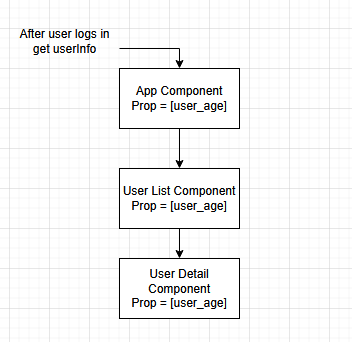
As you can see if we need the user’s details we need to pass the details as props from our top-level App Component to the User Detail Component. Now imagine if this chain is longer and we need to pass every detail of the User. This approach may work if you have to just read the data, but if you need to modify the data, then you can imagine the inefficiency of doing so.
This drilling of prop through layers of components is known as Prop Drilling. So how do we prevent this Prop Drilling and manage our application in an efficient and maintainable way?
The Answer
Using a State Management System like Redux or Context. But wait before that, what exactly is a state?
 Click Here