React Under the Hood
React is a free and open-source front-end JavaScript library that aims to make building user interfaces based on components more seamless, [Wikipedia]. React is getting more and more popular nowadays and almost all companies that plan on building a groundbreaking front-end system have surely given a thought if they should be using React for their next groundbreaking app.
When I started building React Applications myself, I had never really paid attention to how React works under the hood, and I never really understood what the most common terms actually meant, i.e. Virtual Dom, LifeCycle of Components, DOM Updates etc. These weren’t a concern for me at all and I just wanted to build my app fast. I started my journey working with functional components in React, and all I could care about were the things that could help me build faster i.e. hooks; for starters, all I cared about was how to use “props”, “useState” and “useEffect”. After all, these were the only things I needed to build my application and ship them to production.
But if you have ever deployed a React application, you might have already pointed out several issues that will arise due to the lack of fundamental knowledge. It would be just like building a car, just because you know the tire has to move and it needs gas and then you immediately jump to start building the car, and now viola! A whole new set of problem set has shown itself. Now you need a fuel pump because your initial assumption of just pouring the fuel into the engine and hoping it would work has backfired and your car is on a brink of explosion. Someway somehow you made the car run for a few kilometers just by chance, which is obviously very low and now the car can’t make a turn because you don’t know anything about a differential.
You see the point I am trying to make. Fundamental knowledge for building any system is necessary. So now let’s get started straighaway.
JSX- JavaScript XML (Building Blocks of React)
Why do we use JSX when we already have HTML? Is JSX a subset of HTML for React? Does React require us to use JSX?
Do you know the answers to all these questions?
For reference, this is what the react docs state,
JSX is a syntax extension for JavaScript that lets you write HTML-like markup inside a JavaScript file. Although there are other ways to write components, most React developers prefer the conciseness of JSX, and most codebases use it. [React]
So now you might know the answer. Or maybe you have more questions now like what are the other ways? Let us dive deep into those questions. But before everything we need to know about
React Elements
A React Element is a small piece of code representing a part of the User Interface in a React Application.
Every React element is a JavaScript Object at the end.
Let us consider the following example:
<!DOCTYPE html>
<html lang="en">
<head>
<meta charset="UTF-8" />
<meta name="viewport" content="width=device-width, initial-scale=1.0" />
<title>React Elements</title>
<link rel="stylesheet" href="index.css" />
</head>
<body>
<div id="root"></div>
<!-- React CDN -->
<script
crossorigin
src="https://unpkg.com/react@18/umd/react.development.js"
></script>
<script
crossorigin
src="https://unpkg.com/react-dom@18/umd/react-dom.development.js"
></script>
<!-- React Code -->
<script>
const heading = React.createElement(
"h1",
{ id: "heading" },
"Hello World!"
);
const root = ReactDOM.createRoot(document.getElementById("root"));
root.render(heading);
</script>
</body>
</html>
The above example shows a basic react application that creates a “h1” tag saying “Hello World!”. Now what does this create element look like in the console? Let's see that too.
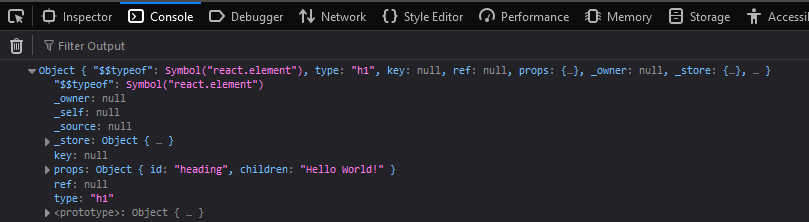
As you can see this returns a type of “Object”. So let’s recall once again.
Every React element is a JavaScript Object at the end.
A ReactElement is simply a representation of a DOM element in the Virtual DOM.
Answer this.
Do browsers natively support JS objects and render them as HTML?
No my dear friends, the Browser does not support JS Objects as HTML elements. We use the root.render() method from ReactDOM to convert the JS Objects into HTML elements, which can then be rendered onto the browser.
NOTE: root.render(document.getElementById(“root”)) replaces the element inside the id “root”.
Now you know the fundamental concepts of React and ReactDOM and why they are used. So now you’re ready to build a real-world application using React Elements.
But wait, in a web app, a single element is never displayed on our webpage so let’s try to build a nested structure using “React.createElement”. Our HTML will look something like this
/**
*
* <div id="parent">
* <div id="child">
* <h1> I am h1 tag </h1>
* <h2> I am h2 tag </h2>
* </div>
* <div id="child2">
* <h1> I am h1 tag </h1>
* <h2> I am h2 tag </h2>
* </div>
* <div>
*/
Now let us write the code in Legacy React
const parent = React.createElement("div", { id: "parent" }, [
React.createElement("div", { id: "child" }, [
React.createElement("h1", {}, "I am an h1 tag"),
React.createElement("h2", {}, "I am an h2 tag"),
]),
React.createElement("div", { id: "child2" }, [
React.createElement("h1", {}, "I am an h1 tag"),
React.createElement("h2", {}, "I am an h2 tag"),
]),
]);
You can see right, how tedious everything is starting to get. Just for a simple HTML as shown above we have to write so much code. Suppose you manage to deploy the application since you’re a 10x developer and of course, you can manage that but now a junior developer who just joined your team has to work on this code on a production website. You can imagine what would happen next.
Here comes JSX
const jsxHeading = <h1 id=”heading”> This is a H1 tag</h1>
First of all, remove the pre-conception that JSX is HTML inside JavaScript.
JSX aims to combine HTML and JavaScript. JSX is HTML-like but not HTML inside JS.
JSX is a React Element i.e. a JS Object
When you write something like:
const greet = <h1> Hello </h1>
what you're essentially doing is this:
const greet = React.createElement(“h1”, {}, “Hello”);
If you console and see the difference between heading and jsxHeading, there will be no difference. And since JSX is very easy to understand and remember unlike React.createElement, we use JSX throughout React application.
So let’s repeat once again. JSX is not HTML inside JS but is HTML-like syntax. JSX is a JavaScript Object i.e. React.createELement() at the end of the day.
And now the curious folks might ask, since JSX is an HTML-like syntax element how is it a JavaScript object? And how is it rendered on my Browser if it’s not HTML?
Well, have you heard of Babel? Yes, that’s right; It’s Babel’s job to transpile (convert) the HTML-like JSX code into React Elements before it reaches the JS engine.
You can see this conversion yourself on Babel’s official website
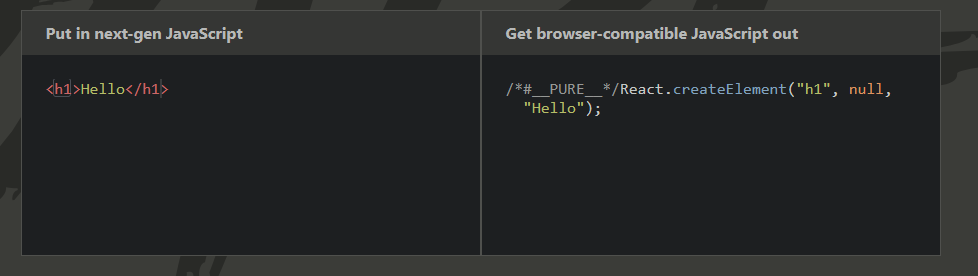
Why do we need to convert it into React Elements?
Because JS engines do not natively support JSX and can only work with ECMAScript syntaxes and nothing else; so we need Babel to transpile the JSX into React Elements which can be read by the JS engine (afterall React Elements are JS Objects). And now the the render method of ReactDOM can work its magic and convert the JS Objects / React Elements into HTML that can be then understood and then be rendered by our browsers.
We also need to use JavaScript inside JSX, so to do that we simply wrap it around “{ }”
<p> Sum {1 + 1} </p>
This results in

That’s it. So now you’ve got a pretty good idea about why we use JSX and why is it used everywhere in React applications.
 Click Here